K8s 调度框架设计与 scheduler plugins 开发部署示例(2024)
本文代码见 github。
- 1 引言
- 2 Pod 调度过程
- 3 开发一个极简 sticky node 调度器插件(out-of-tree)
- 4 总结
- 参考资料
1 引言
K8s 调度框架提供了一种扩展调度功能的插件机制, 对于想实现自定义调度逻辑的场景非常有用。
- 如果 pod spec 里没指定
schedulerName字段,则使用默认调度器; - 如果指定了,就会走到相应的调度器/调度插件。
本文整理一些相关内容,并展示如何用 300 来行代码实现一个简单的固定宿主机调度插件。
代码基于 k8s v1.28。
1.1 调度框架(sceduling framework)扩展点
如下图所示,K8s 调度框架定义了一些扩展点(extension points),
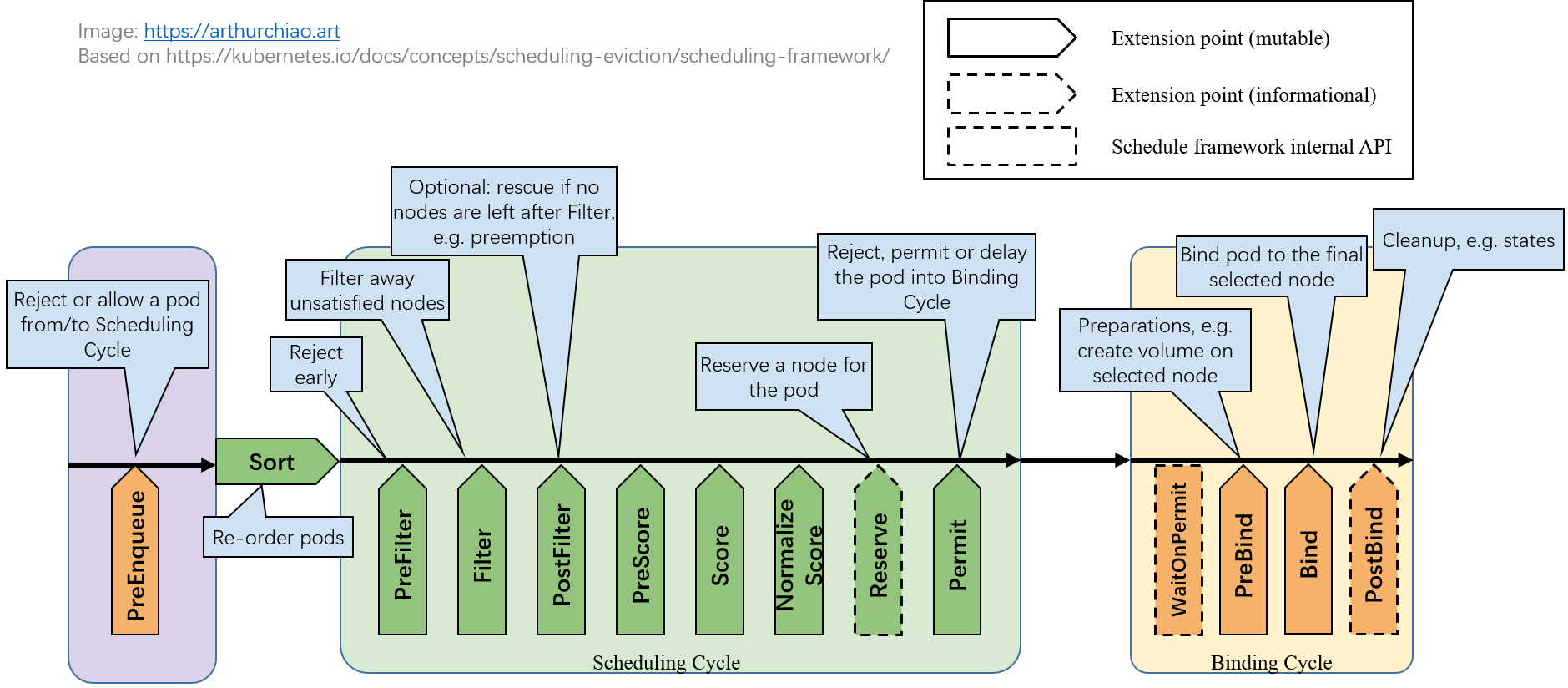
Fig. Scheduling framework extension points.
用户可以编写自己的调度插件(scheduler plugins)注册到这些扩展点来实现想要的调度逻辑。 每个扩展点上一般会有多个 plugins,按注册顺序依次执行。
扩展点根据是否影响调度决策,可以分为两类。
1.1.1 影响调度决策的扩展点
大部分扩展点是影响调度决策的,
- 后面会看到,这些函数的返回值中包括一个成功/失败字段,决定了是允许还是拒绝这个 pod 进入下一处理阶段;
- 任何一个扩展点失败了,这个 pod 的调度就失败了;
1.1.2 不影响调度决策的扩展点(informational)
少数几个扩展点是 informational 的,
- 这些函数没有返回值,因此不能影响调度决策;
- 但是,在这里面可以修改 pod/node 等信息,或者执行清理操作。
1.2 调度插件分类
根据是否维护在 k8s 代码仓库本身,分为两类。
1.2.1 in-tree plugins
维护在 k8s 代码目录 pkg/scheduler/framework/plugins 中,
跟内置调度器一起编译。里面有十几个调度插件,大部分都是常用和在用的,
$ ll pkg/scheduler/framework/plugins
defaultbinder/
defaultpreemption/
dynamicresources/
feature/
imagelocality/
interpodaffinity/
names/
nodeaffinity/
nodename/
nodeports/
noderesources/
nodeunschedulable/
nodevolumelimits/
podtopologyspread/
queuesort/
schedulinggates/
selectorspread/
tainttoleration/
volumebinding/
volumerestrictions/
volumezone/
in-tree 方式每次要添加新插件,或者修改原有插件,都需要修改 kube-scheduler 代码然后编译和 重新部署 kube-scheduler,比较重量级。
1.2.2 out-of-tree plugins
out-of-tree plugins 由用户自己编写和维护,独立部署, 不需要对 k8s 做任何代码或配置改动。
本质上 out-of-tree plugins 也是跟 kube-scheduler 代码一起编译的,不过 kube-scheduler 相关代码已经抽出来作为一个独立项目 github.com/kubernetes-sigs/scheduler-plugins。 用户只需要引用这个包,编写自己的调度器插件,然后以普通 pod 方式部署就行(其他部署方式也行,比如 binary 方式部署)。 编译之后是个包含默认调度器和所有 out-of-tree 插件的总调度器程序,
- 它有内置调度器的功能;
- 也包括了 out-of-tree 调度器的功能;
用法有两种:
- 跟现有调度器并行部署,只管理特定的某些 pods;
- 取代现有调度器,因为它功能也是全的。
1.3 每个扩展点上分别有哪些内置插件
内置的调度插件,以及分别工作在哪些 extention points: 官方文档。 比如,
- node selectors 和 node affinity 用到了
NodeAffinityplugin; - taint/toleration 用到了
TaintTolerationplugin。
2 Pod 调度过程
一个 pod 的完整调度过程可以分为两个阶段:
scheduling cycle:为 pod 选择一个 node,类似于数据库查询和筛选;binding cycle:落实以上选择,类似于处理各种关联的东西并将结果写到数据库。
例如,虽然 scheduling cycle 为 pod 选择了一个 node,但是在接下来的 binding cycle 中,
在这个 node 上给这个 pod 创建 persistent volume 失败了,
那整个调度过程也是算失败的,需要回到最开始的步骤重新调度。
以上两个过程加起来称为一个 scheduling context。
另外,在进入一个 scheduling context 之前,还有一个调度队列, 用户可以编写自己的算法对队列内的 pods 进行排序,决定哪些 pods 先进入调度流程。 总流程如下图所示:
Fig. queuing/sorting and scheduling context
下面分别来看。
2.1 等待调度阶段
2.1.1 PreEnqueue
Pod 处于 ready for scheduling 的阶段。 内部工作原理:sig-scheduling/scheduler_queues.md。
这一步没过就不会进入调度队列,更不会进入调度流程。
2.1.2 QueueSort
对调度队列(scheduling queue)内的 pod 进行排序,决定先调度哪些 pods。
2.2 调度阶段(scheduling cycle)
2.2.1 PreFilter:pod 预处理和检查,不符合预期就提前结束调度
这里的插件可以对 Pod 进行预处理,或者条件检查,函数签名如下:
// https://github.com/kubernetes/kubernetes/blob/v1.28.4/pkg/scheduler/framework/interface.go#L349-L367

// PreFilterPlugin is an interface that must be implemented by "PreFilter" plugins.
// These plugins are called at the beginning of the scheduling cycle.
type PreFilterPlugin interface {
    // PreFilter is called at the beginning of the scheduling cycle. All PreFilter
    // plugins must return success or the pod will be rejected. PreFilter could optionally
    // return a PreFilterResult to influence which nodes to evaluate downstream. This is useful
    // for cases where it is possible to determine the subset of nodes to process in O(1) time.
    // When it returns Skip status, returned PreFilterResult and other fields in status are just ignored,
    // and coupled Filter plugin/PreFilterExtensions() will be skipped in this scheduling cycle.
    PreFilter(ctx , state *CycleState, p *v1.Pod) (*PreFilterResult, *Status)

    // PreFilterExtensions returns a PreFilterExtensions interface if the plugin implements one,
    // or nil if it does not. A Pre-filter plugin can provide extensions to incrementally
    // modify its pre-processed info. The framework guarantees that the extensions
    // AddPod/RemovePod will only be called after PreFilter, possibly on a cloned
    // CycleState, and may call those functions more than once before calling
    // Filter again on a specific node.
    PreFilterExtensions() PreFilterExtensions
}
-
输入:
p *v1.Pod是待调度的 pod;- 第二个参数
state可用于保存一些状态信息,然后在后面的扩展点(例如Filter()阶段)拿出来用;
-
输出:
- 只要有任何一个 plugin 返回失败,这个 pod 的调度就失败了;
- 换句话说,所有已经注册的
PreFilterplugins 都成功之后,pod 才会进入到下一个环节;
2.2.2 Filter:排除所有不符合要求的 node
这里的插件可以过滤掉那些不满足要求的 node(equivalent of Predicates in a scheduling Policy),
- 针对每个 node,调度器会按配置顺序依次执行 filter plugins;
- 任何一个插件 返回失败,这个 node 就被排除了;
// https://github.com/kubernetes/kubernetes/blob/v1.28.4/pkg/scheduler/framework/interface.go#L349C1-L367C2

// FilterPlugin is an interface for Filter plugins. These plugins are called at the
// filter extension point for filtering out hosts that cannot run a pod.
// This concept used to be called 'predicate' in the original scheduler.
// These plugins should return "Success", "Unschedulable" or "Error" in Status.code.
// However, the scheduler accepts other valid codes as well.
// Anything other than "Success" will lead to exclusion of the given host from running the pod.
type FilterPlugin interface {
    Plugin
    // Filter is called by the scheduling framework.
    // All FilterPlugins should return "Success" to declare that
    // the given node fits the pod. If Filter doesn't return "Success",
    // it will return "Unschedulable", "UnschedulableAndUnresolvable" or "Error".
    // For the node being evaluated, Filter plugins should look at the passed
    // nodeInfo reference for this particular node's information (e.g., pods
    // considered to be running on the node) instead of looking it up in the
    // NodeInfoSnapshot because we don't guarantee that they will be the same.
    // For example, during preemption, we may pass a copy of the original
    // nodeInfo object that has some pods removed from it to evaluate the
    // possibility of preempting them to schedule the target pod.
    Filter(ctx , state *CycleState, pod *v1.Pod, nodeInfo *NodeInfo) *Status
}
-
输入:
nodeInfo是当前给定的 node 的信息,Filter()程序判断这个 node 是否符合要求;
-
输出:
- 放行或拒绝。
对于给定 node,如果所有 Filter plugins 都返回成功,这个 node 才算通过筛选, 成为备选 node 之一。
2.2.3 PostFilter:Filter 之后没有 node 剩下,补救阶段
如果 Filter 阶段之后,所有 nodes 都被筛掉了,一个都没剩,才会执行这个阶段;否则不会执行这个阶段的 plugins。
// https://github.com/kubernetes/kubernetes/blob/v1.28.4/pkg/scheduler/framework/interface.go#L392C1-L407C2

// PostFilterPlugin is an interface for "PostFilter" plugins. These plugins are called after a pod cannot be scheduled.
type PostFilterPlugin interface {
    // A PostFilter plugin should return one of the following statuses:
    // - Unschedulable: the plugin gets executed successfully but the pod cannot be made schedulable.
    // - Success: the plugin gets executed successfully and the pod can be made schedulable.
    // - Error: the plugin aborts due to some internal error.
    //
    // Informational plugins should be configured ahead of other ones, and always return Unschedulable status.
    // Optionally, a non-nil PostFilterResult may be returned along with a Success status. For example,
    // a preemption plugin may choose to return nominatedNodeName, so that framework can reuse that to update the
    // preemptor pod's .spec.status.nominatedNodeName field.
    PostFilter(ctx , state *CycleState, pod *v1.Pod, filteredNodeStatusMap NodeToStatusMap) (*PostFilterResult, *Status)
}
- 按 plugin 顺序依次执行,任何一个插件将 node 标记为
Schedulable就算成功,不再执行剩下的 PostFilter plugins。
典型例子:preemptiontoleration,
Filter() 之后已经没有可用 node 了,在这个阶段就挑一个 pod/node,抢占它的资源。
2.2.4 PreScore
PreScore/Score/NormalizeScore 都是给 node 打分的,以最终选出一个最合适的 node。这里就不展开了,
函数签名也在上面给到的源文件路径中,这里就不贴了。
2.2.5 Score
针对每个 node 依次调用 scoring plugin,得到一个分数。
2.2.6 NormalizeScore
2.2.7 Reserve:Informational,维护 plugin 状态信息
// https://github.com/kubernetes/kubernetes/blob/v1.28.4/pkg/scheduler/framework/interface.go#L444C1-L462C2

// ReservePlugin is an interface for plugins with Reserve and Unreserve
// methods. These are meant to update the state of the plugin. This concept
// used to be called 'assume' in the original scheduler. These plugins should
// return only Success or Error in Status.code. However, the scheduler accepts
// other valid codes as well. Anything other than Success will lead to
// rejection of the pod.
type ReservePlugin interface {
    // Reserve is called by the scheduling framework when the scheduler cache is
    // updated. If this method returns a failed Status, the scheduler will call
    // the Unreserve method for all enabled ReservePlugins.
    Reserve(ctx , state *CycleState, p *v1.Pod, nodeName string) *Status
    // Unreserve is called by the scheduling framework when a reserved pod was
    // rejected, an error occurred during reservation of subsequent plugins, or
    // in a later phase. The Unreserve method implementation must be idempotent
    // and may be called by the scheduler even if the corresponding Reserve
    // method for the same plugin was not called.
    Unreserve(ctx , state *CycleState, p *v1.Pod, nodeName string)
}
这里有两个方法,都是 informational,也就是不影响调度决策;
维护了 runtime state (aka “stateful plugins”) 的插件,可以通过这两个方法
接收 scheduler 传来的信息:
-
Reserve用来避免 scheduler 等待
bind操作结束期间,因 race condition 导致的错误。 只有当所有Reserveplugins 都成功后,才会进入下一阶段,否则 scheduling cycle 就中止了。 -
Unreserve调度失败,这个阶段回滚时执行。
Unreserve()必须幂等,且不能 fail。
2.2.8 Permit:允许/拒绝/等待进入 binding cycle
这是 scheduling cycle 的最后一个扩展点了,可以阻止或延迟将一个 pod binding 到 candidate node。
// PermitPlugin is an interface that must be implemented by "Permit" plugins.
// These plugins are called before a pod is bound to a node.
type PermitPlugin interface {
    // Permit is called before binding a pod (and before prebind plugins). Permit
    // plugins are used to prevent or delay the binding of a Pod. A permit plugin
    // must return success or wait with timeout duration, or the pod will be rejected.
    // The pod will also be rejected if the wait timeout or the pod is rejected while
    // waiting. Note that if the plugin returns "wait", the framework will wait only
    // after running the remaining plugins given that no other plugin rejects the pod.
    Permit(ctx , state *CycleState, p *v1.Pod, nodeName string) (*Status, time.Duration)
}
三种结果:
- approve:所有 Permit plugins 都 appove 之后,这个 pod 就进入下面的 binding 阶段;
- deny:任何一个 Permit plugin deny 之后,就无法进入 binding 阶段。这会触发
Reserveplugins 的Unreserve()方法; - wait (with a timeout):如果有 Permit plugin 返回 “wait”,这个 pod 就会进入一个 internal “waiting” Pods list;
2.3 绑定阶段(binding cycle)
Fig. Scheduling framework extension points.
2.3.1 PreBind:Bind 之前的预处理,例如到 node 上去挂载 volume
例如,在将 pod 调度到一个 node 之前,先给这个 pod 在那台 node 上挂载一个 network volume。
// PreBindPlugin is an interface that must be implemented by "PreBind" plugins.
// These plugins are called before a pod being scheduled.
type PreBindPlugin interface {
    // PreBind is called before binding a pod. All prebind plugins must return
    // success or the pod will be rejected and won't be sent for binding.
    PreBind(ctx , state *CycleState, p *v1.Pod, nodeName string) *Status
}
- 任何一个 PreBind plugin 失败,都会导致 pod 被 reject,进入到
reserveplugins 的Unreserve()方法;
2.3.2 Bind:将 pod 关联到 node
所有 PreBind 完成之后才会进入 Bind。
// https://github.com/kubernetes/kubernetes/blob/v1.28.4/pkg/scheduler/framework/interface.go#L497

// Bind plugins are used to bind a pod to a Node.
type BindPlugin interface {
    // Bind plugins will not be called until all pre-bind plugins have completed. Each
    // bind plugin is called in the configured order. A bind plugin may choose whether
    // or not to handle the given Pod. If a bind plugin chooses to handle a Pod, the
    // remaining bind plugins are skipped. When a bind plugin does not handle a pod,
    // it must return Skip in its Status code. If a bind plugin returns an Error, the
    // pod is rejected and will not be bound.
    Bind(ctx , state *CycleState, p *v1.Pod, nodeName string) *Status
}
- 所有 plugin 按配置顺序依次执行;
- 每个 plugin 可以选择是否要处理一个给定的 pod;
- 如果选择处理,后面剩下的 plugins 会跳过。也就是最多只有一个 bind plugin 会执行。
2.3.3 PostBind:informational,可选,执行清理操作
这是一个 informational extension point,也就是无法影响调度决策(没有返回值)。
- bind 成功的 pod 才会进入这个阶段;
- 作为 binding cycle 的最后一个阶段,一般是用来清理一些相关资源。
// https://github.com/kubernetes/kubernetes/blob/v1.28.4/pkg/scheduler/framework/interface.go#L473

// PostBindPlugin is an interface that must be implemented by "PostBind" plugins.
// These plugins are called after a pod is successfully bound to a node.
type PostBindPlugin interface {
    // PostBind is called after a pod is successfully bound. These plugins are informational.
    // A common application of this extension point is for cleaning
    // up. If a plugin needs to clean-up its state after a pod is scheduled and
    // bound, PostBind is the extension point that it should register.
    PostBind(ctx , state *CycleState, p *v1.Pod, nodeName string)
}
3 开发一个极简 sticky node 调度器插件(out-of-tree)
这里以 kubevirt 固定宿主机调度 VM 为例,展示如何用几百行代码实现一个 out-of-tree 调度器插件。
3.1 设计
3.1.1 背景知识
一点背景知识 [2,3]:
VirtualMachine是一个虚拟机 CRD;- 一个
VirtualMachine会对应一个VirtualMachineInstance,这是一个运行中的VirtualMachine; - 一个
VirtualMachineInstance对应一个Pod;
如果发生故障,VirtualMachineInstance 和 Pod 可能会重建和重新调度,但 VirtualMachine 是不变的;
VirtualMachine <--> VirtualMachineInstance/Pod 的关系,
类似于 StatefulSet <--> Pod 的关系。
3.1.2 业务需求
VM 创建之后只要被调度到某台 node,以后不管发生什么故障,它永远都被调度到这个 node 上(除非人工干预)。
可能场景:VM 挂载了宿主机本地磁盘,因此换了宿主机之后数据就没了。 故障场景下,机器或容器不可用没关系,微服务系统自己会处理实例的健康检测和流量拉出, 底层基础设施保证不换宿主机就行了,这样故障恢复之后数据还在。
技术描述:
- 用户创建一个
VirtualMachine后,能正常调度到一台 node 创建出来; - 后续不管发生什么问题(pod crash/eviction/recreate、node restart …),这个
VirtualMachine都要被调度到这台机器。
3.1.3 技术方案
- 用户创建一个
VirtualMachine后,由默认调度器给它分配一个 node,然后将 node 信息保存到VirtualMachineCR 上; - 如果
VirtualMachineInstance或Pod被删除或发生重建,调度器先找到对应的VirtualMachineCR, 如果 CR 中有保存的 node 信息,就用这个 node;否则(必定是第一次调度),转 1。
3.2 实现
实现以上功能需要在三个位置注册调度扩展函数:
PreFilterFilterPostBind
代码基于 k8s v1.28。
3.2.1 Prefilter()
主要做一些检查和准备工作,
- 如果不是我们的 Pod:直接返回成功,留给其他 plugin 去处理;
-
如果是我们的 Pod,查询关联的 VMI/VM CR,这里分两种情况:
- 找到了:说明之前已经调度过(可能是 pod 被删除了导致重新调度),我们应该解析出原来的 node,供后面
Filter()阶段使用; - 没找到:说明是第一次调度,什么都不做,让默认调度器为我们选择初始 node。
- 找到了:说明之前已经调度过(可能是 pod 被删除了导致重新调度),我们应该解析出原来的 node,供后面
- 将 pod 及为它选择的 node(没有就是空)保存到一个 state 上下文中,这个 state 会传给后面的
Filter()阶段使用。
// PreFilter invoked at the preFilter extension point.
func (pl *StickyVM) PreFilter(ctx , state *framework.CycleState, pod *v1.Pod) (*framework.PreFilterResult, *framework.Status) {
    s := stickyState{false, ""}

    // Get pod owner reference
    podOwnerRef := getPodOwnerRef(pod)
    if podOwnerRef == nil {
        return nil, framework.NewStatus(framework.Success, "Pod owner ref not found, return")
    }

    // Get VMI
    vmiName := podOwnerRef.Name
    ns := pod.Namespace

    vmi := pl.kubevirtClient.VirtualMachineInstances(ns).Get(context.TODO(), vmiName, metav1.GetOptions{ResourceVersion: "0"})
    if err != nil {
        return nil, framework.NewStatus(framework.Error, "get vmi failed")
    }

    vmiOwnerRef := getVMIOwnerRef(vmi)
    if vmiOwnerRef == nil {
        return nil, framework.NewStatus(framework.Success, "VMI owner ref not found, return")
    }

    // Get VM
    vmName := vmiOwnerRef.Name
    vm := pl.kubevirtClient.VirtualMachines(ns).Get(context.TODO(), vmName, metav1.GetOptions{ResourceVersion: "0"})
    if err != nil {
        return nil, framework.NewStatus(framework.Error, "get vmi failed")
    }

    // Annotate sticky node to VM
    s.node, s.nodeExists = vm.Annotations[stickyAnnotationKey]
    return nil, framework.NewStatus(framework.Success, "Check pod/vmi/vm finish, return")
}
3.2.2 Filter()
调度器会根据 pod 的 nodeSelector 等,为我们初步选择出一些备选 nodes。
然后会遍历这些 node,依次调用各 plugin 的 Filter() 方法,看这个 node 是否合适。
伪代码:
// For a given pod
for node in selectedNodes:
    for pl in plugins:
        pl.Filter(ctx, customState, pod, node)
我们的 plugin 逻辑,首先解析传过来的 state/pod/node 信息,
-
如果 state 中保存了一个 node,
- 如果保存的这个 node 就是当前
Filter()传给我们的 node,返回成功; - 对于其他所有 node,都返回失败。
以上的效果就是:只要这个 pod 上一次调度到某个 node,我们就继续让它调度到这个 node, 也就是“固定宿主机调度”。
- 如果保存的这个 node 就是当前
-
如果 state 中没有保存的 node,说明是第一次调度,也返回成功,默认调度器会给我们分一个 node。 我们在后面的
PostBind阶段把这个 node 保存到 state 中。
func (pl *StickyVM) Filter(ctx , state *framework.CycleState, pod *v1.Pod, nodeInfo *framework.NodeInfo) *framework.Status {
    s := state.Read(stateKey)
    if err != nil {
        return framework.NewStatus(framework.Error, fmt.Sprintf("read preFilter state fail: %v", err))
    }

    r, ok := s.(*stickyState)
    if !ok {
        return framework.NewStatus(framework.Error, fmt.Sprintf("convert %+v to stickyState fail", s))
    }
    if !r.nodeExists {
        return nil
    }

    if r.node != nodeInfo.Node().Name {
        // returning "framework.Error" will prevent process on other nodes
        return framework.NewStatus(framework.Unschedulable, "already stick to another node")
    }

    return nil
}
3.2.3 PostBind()
能到这个阶段,说明已经为 pod 选择好了一个 node。我们只需要检查下这个 node 是否已经保存到 VM CR 中, 如果没有就保存之。
func (pl *StickyVM) PostBind(ctx , state *framework.CycleState, pod *v1.Pod, nodeName string) {
    s := state.Read(stateKey)
    if err != nil {
        return
    }

    r, ok := s.(*stickyState)
    if !ok {
        klog.Errorf("PostBind: pod %s/%s: convert failed", pod.Namespace, pod.Name)
        return
    }

    if r.nodeExists {
        klog.Errorf("PostBind: VM already has sticky annotation, return")
        return
    }

    // Get pod owner reference
    podOwnerRef := getPodOwnerRef(pod)
    if podOwnerRef == nil {
        return
    }

    // Get VMI owner reference
    vmiName := podOwnerRef.Name
    ns := pod.Namespace

    vmi := pl.kubevirtClient.VirtualMachineInstances(ns).Get(context.TODO(), vmiName, metav1.GetOptions{ResourceVersion: "0"})
    if err != nil {
        return
    }

    vmiOwnerRef := getVMIOwnerRef(vmi)
    if vmiOwnerRef == nil {
        return
    }

    // Add sticky node to VM annotations
    retry.RetryOnConflict(retry.DefaultRetry, func() error {
        vmName := vmiOwnerRef.Name
        vm := pl.kubevirtClient.VirtualMachines(ns).Get(context.TODO(), vmName, metav1.GetOptions{ResourceVersion: "0"})
        if err != nil {
            return err
        }

        if vm.Annotations == nil {
            vm.Annotations = make(map[string]string)
        }

        vm.Annotations[stickyAnnotationKey] = nodeName
        if _ = pl.kubevirtClient.VirtualMachines(pod.Namespace).Update(ctx, vm, metav1.UpdateOptions{}); err != nil {
            return err
        }
        return nil
    })
}
前面提到过,这个阶段是 informational 的,
它不能影响调度决策,所以它没有返回值。
3.2.4 其他说明
以上就是核心代码,再加点初始化代码和脚手架必需的东西就能编译运行了。 完整代码见 这里 (不包括依赖包)。
实际开发中,golang 依赖问题可能比较麻烦,需要根据 k8s 版本、scheduler-plugins 版本、golang 版本、kubevirt 版本等等自己解决。
3.3 部署
Scheduling plugins 跟网络 CNI plugins 不同,后者是可执行文件(binary),放到一个指定目录就行了。 Scheduling plugins 是 long running 服务。
3.3.1 配置
为我们的 StickyVM scheduler 创建一个配置:
$ cat ksc.yaml
apiVersion: kubescheduler.config.k8s.io/v1
kind: KubeSchedulerConfiguration
clientConnection:
  kubeconfig: "/etc/kubernetes/scheduler.kubeconfig"
profiles:
- schedulerName: stickyvm
  plugins:
    preFilter:
      enabled:
      - name: StickyVM
      disabled:
      - name: NodeResourceFit
    filter:
      enabled:
      - name: StickyVM
      disabled:
      - name: NodePorts
      # - name: "*"
    reserve:
      disabled:
      - name: "*"
    preBind:
      disabled:
      - name: "*"
    postBind:
      enabled:
      - name: StickyVM
      disabled:
      - name: "*"
一个 ksc 里面可以描述多个 profile, 会启动多个独立 scheduler。 由于这个配置是给 kube-scheduler 的,而不是 kube-apiserver,
# content of the file passed to "--config"
apiVersion: kubescheduler.config.k8s.io/v1alpha1
kind: KubeSchedulerConfiguration
所以
k api-resources或k get KubeSchedulerConfiguration都是找不到这个资源的。
pod 想用哪个 profile,就填对应的 schdulerName。
如果没指定,就是 default-scheduler。
3.3.2 运行
不需要对 k8s 做任何配置改动,作为普通 pod 部署运行就行(需要创建合适的 CluterRole 等等)。
这里为了方面,用 k8s cluster admin 证书直接从开发机启动,适合开发阶段快速迭代:
$ ./bin/stickyvm-scheduler --leader-elect=false --config ksc.yaml
Creating StickyVM scheduling plugin
Creating kubevirt clientset
Create kubevirt clientset successful
Create StickyVM scheduling plugin successful
Starting Kubernetes Scheduler" version="v0.0.20231122"
Golang settings" GOGC="" GOMAXPROCS="" GOTRACEBACK=""
Serving securely on [::]:10259
"Starting DynamicServingCertificateController"
3.4 测试
只需要在 VM CR spec 里面指定调度器名字。
3.4.1 首次创建 VM
新创建一个 VM 时的 workflow,
- yaml 里指定用
schedulerName: stickyvm, - k8s 默认调度器自动选一个 node,
StickyVM根据 ownerref 依次拿到 vmi/vm,然后在 postbind hook 里将这个 node 添加到 VM annotation 里;
日志:
Prefilter: start
Prefilter: processing pod default/virt-launcher-kubevirt-smoke-fedora-nd4hp
PreFilter: parent is VirtualMachineInstance kubevirt-smoke-fedora
PreFilter: found corresponding VMI
PreFilter: found corresponding VM
PreFilter: VM has no sticky node, skip to write to scheduling context
Prefilter: finish
Filter: start
Filter: pod default/virt-launcher-kubevirt-smoke-fedora-nd4hp, sticky node not exist, got node-1, return success
PostBind: start: pod default/virt-launcher-kubevirt-smoke-fedora-nd4hp
PostBind: annotating selected node node-1 to VM
PostBind: parent is VirtualMachineInstance kubevirt-smoke-fedora
PostBind: found corresponding VMI
PostBind: found corresponding VM
PostBind: annotating node node-1 to VM: kubevirt-smoke-fedora
3.4.2 删掉 VMI/Pod,重新调度时
删除 vmi 或者 pod,StickyVM plugin 会在 prefilter 阶段从 annotation 拿出这个
node 信息,然后在 filter 阶段做判断,只有过滤到这个 node 时才返回成功,从而实现
固定 node 调度的效果:
Prefilter: start
Prefilter: processing pod default/virt-launcher-kubevirt-smoke-fedora-m8f7v
PreFilter: parent is VirtualMachineInstance kubevirt-smoke-fedora
PreFilter: found corresponding VMI
PreFilter: found corresponding VM
PreFilter: VM already sticky to node node-1, write to scheduling context
Prefilter: finish
Filter: start
Filter: default/virt-launcher-kubevirt-smoke-fedora-m8f7v, already stick to node-1, skip node-2
Filter: start
Filter: default/virt-launcher-kubevirt-smoke-fedora-m8f7v, given node is sticky node node-1, return success
Filter: finish
Filter: start
Filter: default/virt-launcher-kubevirt-smoke-fedora-m8f7v, already stick to node-1, skip node-3
PostBind: start: pod default/virt-launcher-kubevirt-smoke-fedora-m8f7v
PostBind: VM already has sticky annotation, return
这时候 VM 上已经有 annotation,因此 postbind 阶段不需要做任何事情。
4 总结
本文整理了一些 k8s 调度框架和扩展插件相关的内容,并通过一个例子展示了开发和部署过程。
参考资料
- github.com/kubernetes-sigs/scheduler-plugins
- Virtual Machines on Kubernetes: Requirements and Solutions (2023)
- Spawn a Virtual Machine in Kubernetes with kubevirt: A Deep Dive (2023)
- Scheduling Framework, kubernetes.io
- github.com/kubernetes-sigs/scheduler-plugins